Designing an Agentic Compliance Workflow
The Problem
Regulated compliance work — the kind that produces legally binding determinations about sensitive data — was, until recently, an intensely manual process.
An expert determination could take weeks. Implementation leads would collect the necessary evidence — a client’s SOC 2 report, data use agreements, data dictionaries, data flow diagrams, prior determinations — and drop it all into shared drives. Sometimes the same document would be collected two or three times, because no one could remember where the last copy lived. Intake questions were answered by whoever happened to have the client on the phone. Sometimes the client, sometimes the lead, sometimes both.
The real problem wasn’t speed, though speed was bad. It was consistency.
The same organizational information — what a company does, who it serves, how it handles data — was re-entered into every new determination, and re-entered differently every time. Different leads described the same client in different words, chose different examples, emphasized different risks. Because that organizational context fed the determination itself, inconsistency at the input polluted the output. An organization could receive one determination in March and a different one in June, on essentially the same underlying facts, and no one could reliably explain the difference.
For a document that carries legal weight, that isn’t a rough edge. It’s a foundational problem.
The Users
Five roles touch this workflow, and each has a different relationship to trust, speed, and control.
Implementation leads are internal — they guide clients through the process. The goal of the redesign was to shrink their involvement, so the product could stand on its own as SaaS rather than as consulting.
Client project managers own the majority of the input on the client side. They answer organizational and use-case questions and drive the workflow end to end.
Client data engineers handle everything technical: connecting data sources, uploading data dictionaries, answering the data-specific questions.
Expert reviewers — a hybrid team of legal and security specialists — review the generated determination, correct errors, and sign it. They are the last line of defense before something becomes legally binding.
Signatories — client project managers, in-house counsel on the client side, and internal executives — provide final sign-off.
These roles pull in different directions. Implementation leads want to fade from the process. Client project managers want autonomy without feeling exposed. Expert reviewers want confidence in what they’re signing. Every one of those needs converges at the same moment — sign-off — where a document with legal weight becomes committed.
Research included direct interviews with all five: understanding where implementation leads were stuck, where client PMs got confused, what expert reviewers actually looked for in a report, and what a defensible determination had to prove.
What this system had to get right
Before drawing any screens, I set four rules for the system.
1. Capture organizational truth once, and reuse it. Everything that describes a client’s identity — their name, their market, their data practices, their legal posture — lives in one place, is versioned, and is pulled from automatically. A single source of truth was the fix to inconsistency, and it had to come first.
2. Start users at three-quarters done, not zero. If the system already has the evidence to answer a question, the user shouldn’t have to type the answer. Their job is to review and approve, not to author from scratch. This is a fundamental shift in what the human is being asked to do — from filling out a form to auditing a draft. In practice, the system behaves as a copilot: the AI drafts, the human stays in control and approves.
3. Constrain the agents tightly. Accuracy over coverage. In high-trust domains, an agent that guesses is worse than an agent that says nothing. Every agent is scoped to a specific document set, a specific target, and a specific answer shape. Guardrails aren’t a limitation on AI. They are the design.
4. Keep humans in control wherever judgment carries legal weight, and always make the AI’s reasoning visible. Explainability isn’t a UI feature bolted on top. It’s the reason the system can be trusted at all.
The System
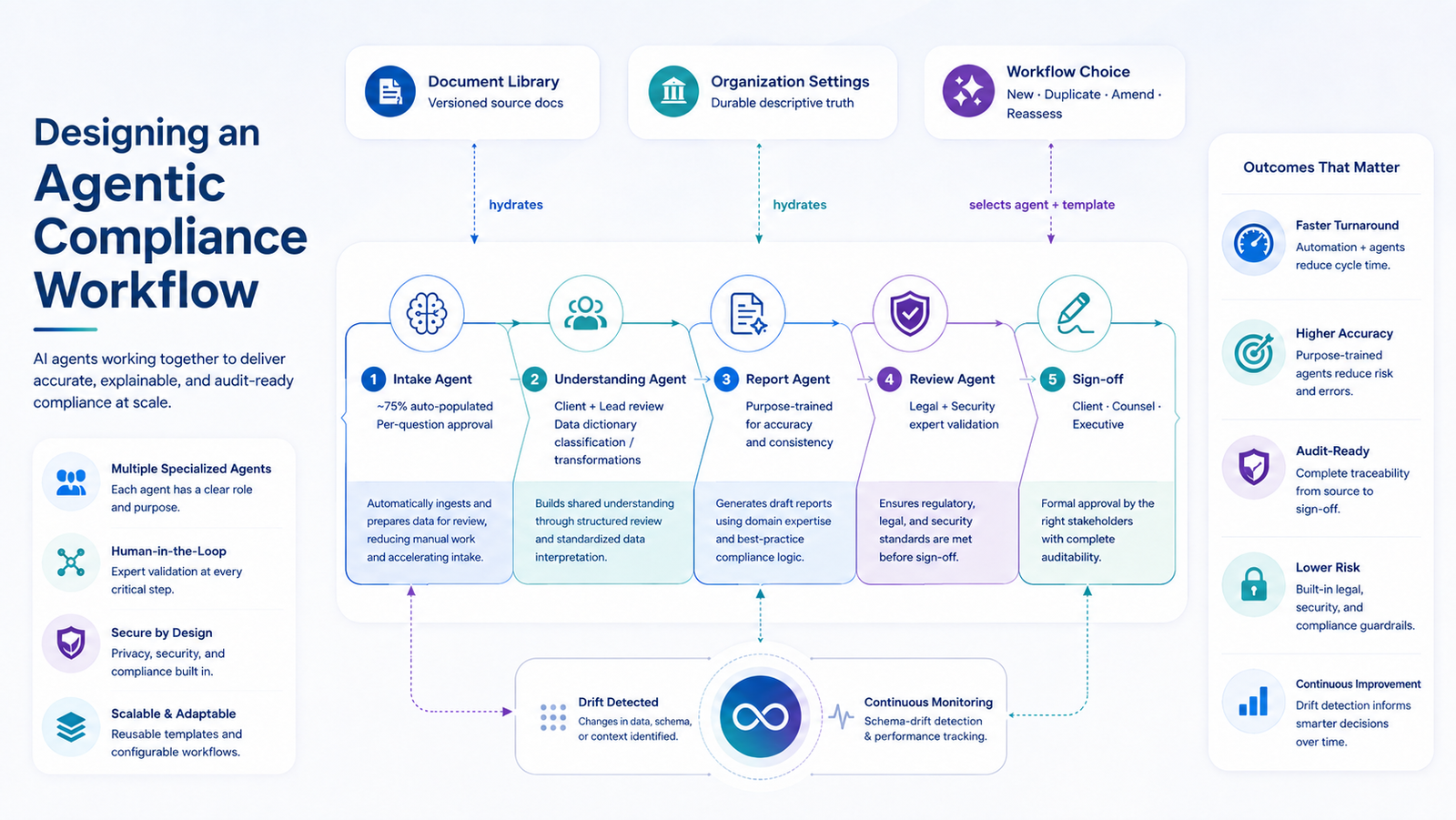
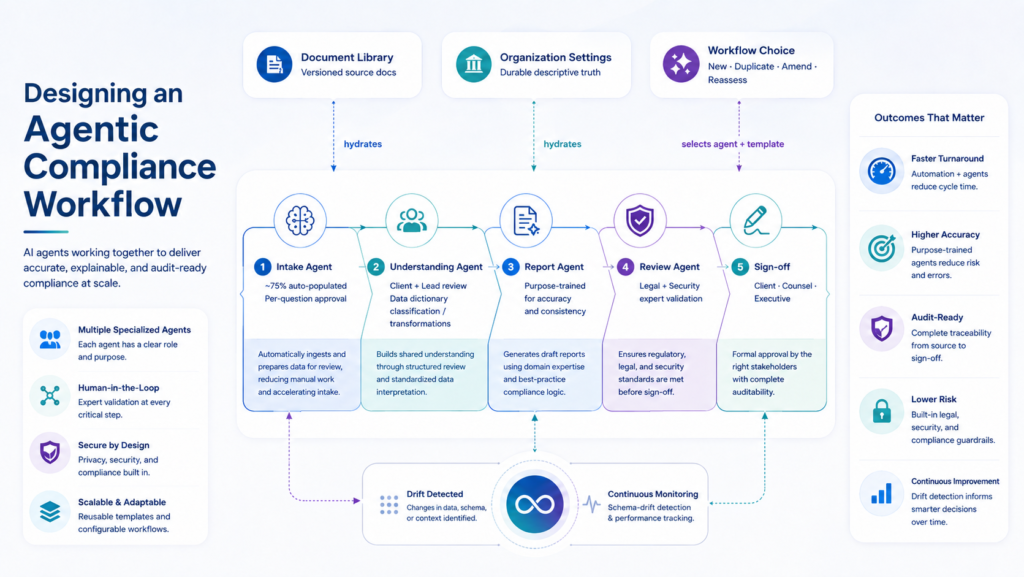
The workflow is a loop that begins with evidence and closes with continuous monitoring.
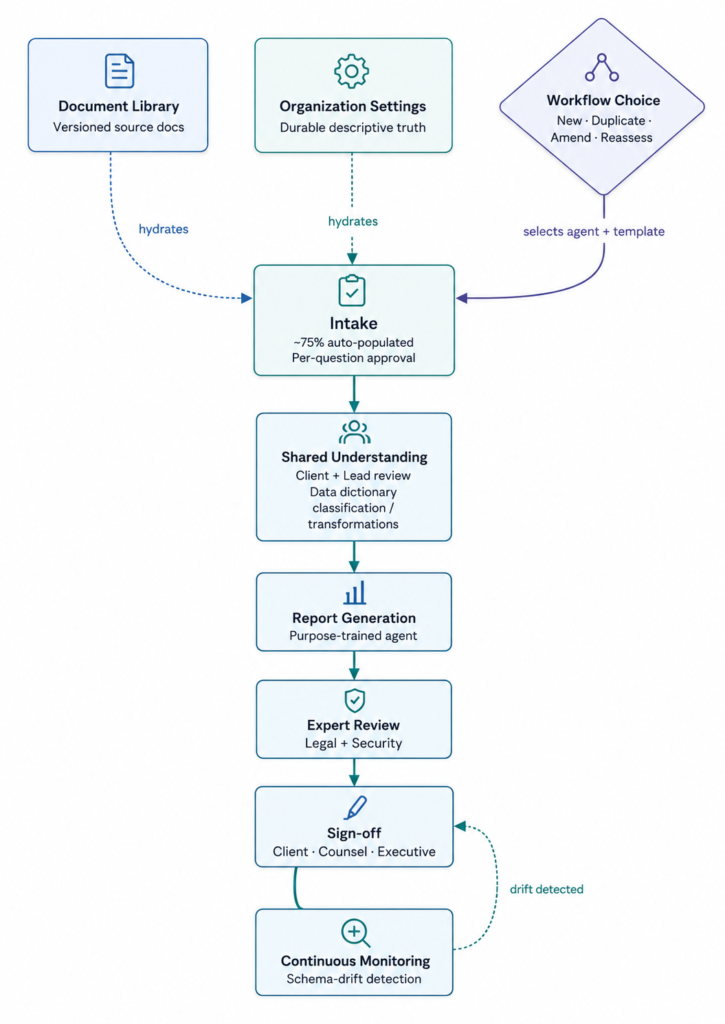
At the front, two persistent stores hold the durable foundation:
- The document library — every source document a client provides, versioned so a new SOC 2 supersedes the old one without erasing history.
- Organization settings — the descriptive truth about the client: name, market, use cases, data practices.
These are never re-entered. Once captured, they hydrate every workflow that follows.
When a user starts a workflow, they choose one of four entry paths (more on this in a moment). The system populates the intake — an interview of roughly thirty-five questions — by pulling from the library and organization settings. On a typical workflow, about three-quarters of the questions arrive pre-answered. The user reviews each answer, approves or corrects it, and answers the remaining ones by hand.
Once the intake is complete, the system assembles a shared understanding — a consolidated picture of everything the determination will rest on. This is also where the data dictionary is classified: the client has synced their data and uploaded their data dictionary, and the system works through it column by column, defining the transformations needed to de-identify the data — which columns to drop, which to transform, which to date-shift, which to truncate.
Both the client user and the implementation lead then review the shared understanding — the intake answers and the data classification together — and confirm it before generation.
Then a purpose-trained agent generates the expert determination report, based on the specific workflow type the user chose. Expert reviewers — the hybrid legal-and-security team — review it and work through it with the client user until both sides agree. The finalized determination is then signed by the executive team, the lead lawyer, and the client’s signatory.
Because the data dictionary classification was settled during the shared understanding step, the de-identification instructions live inside the legally binding document itself. The determination doesn’t just say the data is de-identified — it specifies exactly how.
After sign-off, continuous monitoring watches the live data in the client’s systems, checking for schema drift — any change that would violate the agreed-upon de-identified state. Drift triggers remediation, which loops back to the determination.
The system doesn’t produce a report. It produces a living compliance state.
The Four Workflows
The most consequential architectural decision in this system was that the workflow entry point isn’t one path. It’s four.
This wasn’t obvious. Early in the design, a senior engineering leader argued for a single unified path. Simpler to build, simpler to explain. I pushed back, because the workflow choice isn’t a UI preference — it’s what tells the system which agent to invoke and which report template to generate. Without that choice, the system has no way to know what the correct output even is.
The four paths mirror how compliance work actually recurs:
Start new. A fresh workflow. Auto-populates the intake, auto-pulls the expected document set. The user can add or remove documents as needed.
Duplicate. Clone a completed workflow — including its questions — then edit. Built for clients who serve their own downstream clients with near-identical needs. Massive time savings when the same pattern repeats.
Amend. Take a signed determination that now requires revision, and adjust it. Everything pre-populates from the original.
Reassessment. The annual renewal path. Pull last year’s determination and update only what changed.
Once a user picks a determination type and one of the four paths, the system previews what’s ahead — a small panel showing how many intake questions will arrive pre-answered from the library, and how many will need to be handled by hand. Users see the shape of the work before they start it.
Compliance work is rarely net-new. It’s variations on prior work — copies, amendments, renewals. Designing entry points that match the real shape of the work — rather than forcing every workflow to start from zero — turned out to be one of the highest-leverage decisions in the system.
Human-in-the-loop, by design
Blue: human-driven. Grey: AI-driven. Of ten steps in the workflow, six are human — and every AI step is bracketed by human judgment on either side.
There are four places in this system where a human is required to intervene, and each one is deliberate.
At per-question approval, the human catches hallucinations before they compound. It’s the moment the user shifts from consumer of AI output to auditor of it — the copilot handoff, where the human takes the wheel.
At the shared understanding review, both the client and the implementation lead confirm the foundation before any expensive generation happens. This is a cost-of-error checkpoint.
At expert review of the generated determination, trained legal and security specialists apply judgment that no agent should apply on its own. This is where domain expertise stays sovereign.
At sign-off, multiple parties — client, counsel, executive — commit their names to the outcome. This is the accountability layer.
Automation without these checkpoints would be faster. It would also be indefensible. The design position is that in domains where being wrong has legal consequences, the human role isn’t a fallback. It’s the product.
A design system built for the AI-native era
The system needed a design system, and the design system needed to move as fast as the product.
I built the initial style guide in Figma — a full component library, design tokens for color, type, spacing, and elevation, and workflow-specific interaction patterns. Then I exported it out of Figma and used an agentic development environment as the IDE to generate a live, navigable reference site — Storybook-like, but generated rather than hand-coded. Engineers browse components, see live code examples, and export the full token set as a CSS file that drops directly into the product.
The whole pipeline — Figma to reference site to production tokens — is designed around the assumption that agentic coding is the actual build environment now, not a supplementary tool. Alongside the reference site and CSS export, the system produces a Markdown specification of the design language — the same tokens, components, and patterns, but structured for engineers and agents to prompt against directly. The design system becomes a source of truth that both humans and AI can consume without translation.
Impact
The shift is both measurable and qualitative.
Measurable. On a typical workflow of roughly thirty-five intake questions, about twenty-six arrive pre-populated from the document library and organization settings. Users answer around nine by hand. What was once weeks of consulting-style manual work is now a review-and-approve session.
Qualitative. The human’s job changed. The implementation lead’s role shrank from “primary author of every determination” to “exception handler and quality guarantor.” The client user moved from “answering a blank form” to “reviewing a defensible draft.” Expert reviewers can focus their time on judgment calls, not typing.
And organizational consistency — the original problem — is now a property of the system, not a hope. The same underlying facts produce the same determination, every time.
Where this pattern travels
This is a pattern for any domain where automation must coexist with legal or ethical accountability: healthcare, financial services, product safety, environmental compliance, defense procurement, pharma, insurance underwriting.
The specifics change — different documents, different agents, different reviewers. The shape doesn’t. Persistent evidence stores. Auto-hydrated intake. Tightly constrained agents. Multiple human-in-the-loop checkpoints. Explainable reasoning. Continuous monitoring closing the loop.
Wherever the cost of being wrong is high and the volume of the work is growing, this is the shape of the answer.
Case study describes work led by the author. All specifics have been abstracted to protect client and employer confidentiality.